
Oct 16, 2026
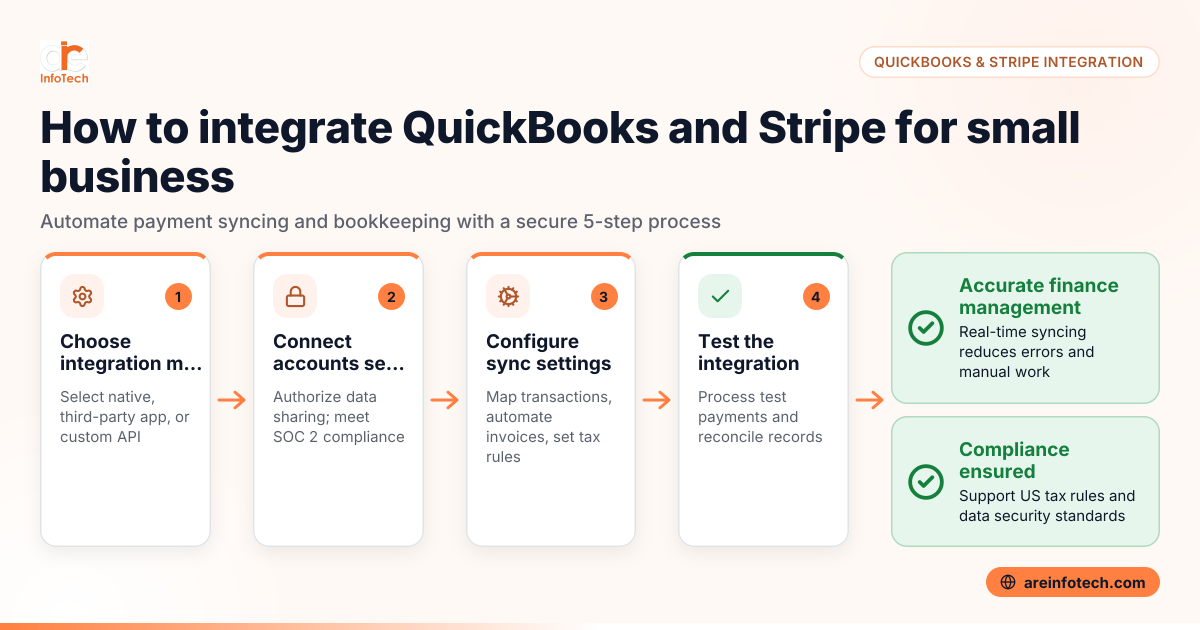
Integrating QuickBooks and Stripe creates a streamlined finance management system for small businesses in the United States. This connection automates payment tracking and accounting, saving time and reducing errors. Syncing financial data in real time simplifies business finance and improves accuracy.
Integrating QuickBooks and Stripe automates syncing of payment data to accounting records, saving time and cutting errors. This connection improves cash flow visibility and simplifies bookkeeping for US small businesses.
QuickBooks is widely used for accounting, and Stripe is a popular payment processor. When linked, Stripe transactions such as sales, fees, and refunds automatically update in QuickBooks. This eliminates the need for manual data entry, accelerates month-end close, and improves financial accuracy. For example, a Chicago retailer can instantly reconcile online payments processed by Stripe with QuickBooks invoices, reducing paperwork and errors.
The integration also supports compliance with US tax requirements. It enables accurate profit and loss reports and balance sheets generated from live data. Small businesses reduce bookkeeping costs and gain clearer financial insights through this seamless flow of information.
Integration costs vary based on the tool or app used. Some options come bundled with QuickBooks Online subscriptions; third-party apps typically charge $10 to $50 per month. Stripe’s standard processing fees (about 2.9% + 30¢ per transaction) remain unaffected. Choose a plan that matches your business size and transaction volume.
Integrate QuickBooks and Stripe using native connectors, third-party apps, or custom API solutions designed for US small businesses.
This structured setup minimizes manual work while improving financial accuracy.
AI integration in QuickBooks automates bookkeeping tasks like transaction categorization and report generation, saving time and reducing errors.
Small businesses can apply AI tools that ai integrate QuickBooks and Stripe data for smarter processing. AI can automatically classify transactions, detect irregularities, and suggest corrections. This enhances decision-making speed and accuracy—especially useful for US businesses managing complex sales tax and financial reporting. ARE InfoTech can help you implement AI-powered workflows to optimize your bookkeeping efficiently.
Use integration tools that accurately record transactions and support state sales tax collection while maintaining secure data handling standards like SOC 2.
The integration must properly capture tax on online sales for states like Texas and California. It should track 1099 vendor payments in QuickBooks to simplify year-end reporting. Secure handling of payment data aligned with PCI compliance protects customers. Also, if you conduct outreach, follow CAN-SPAM and TCPA rules. Staying compliant avoids costly audits or penalties across US states.
Detroit businesses can improve cash flow visibility and reduce accounting errors by syncing Stripe payments directly into QuickBooks.
This real-time integration helps manage payment delays and complex invoicing common in Detroit commerce. Automated syncing of sales data aids in accurate budgeting and forecasting. It also supports Michigan-specific tax scenarios to prevent filing mistakes. Overall, Detroit retailers and services gain smoother operations and more focus on business growth.
Zapier, Automate.io, and OneSaas are popular apps for connecting QuickBooks and Stripe in the US.
Zapier lets you build custom workflows triggered by Stripe payments that update QuickBooks records automatically. Automate.io offers similar automation with a simple interface. OneSaas integrates e-commerce data and ensures tax compliance. Select tools that meet US regulatory requirements and fit your transaction volume. For detailed comparisons, visit the ARE InfoTech blog.
Automation helps classify taxable sales and fees in QuickBooks, easing state sales tax filing obligations.
The integration ensures Stripe sales synced to QuickBooks include necessary tax details to match invoices. This reduces manual corrections and streamlines quarterly tax submissions. It supports compliance with specific state rules, such as those in Illinois or Florida, ensuring your books are ready for audits.
Start by assessing your QuickBooks and Stripe subscriptions for native integration options. Explore reliable third-party apps next. Follow a stepwise process to link accounts and set sync rules. Get expert guidance from ARE InfoTech to utilize AI tools that boost automation and accuracy.
For further finance tips, read How to Use Google Analytics 4 to Improve B2B Lead Conversion for Small Businesses in United States.
Yes. Many integration tools support multiple Stripe accounts linked to a single QuickBooks company, helping businesses with different sales channels stay organized and reconcile transactions efficiently.
Most integrations sync Stripe refunds and disputes to QuickBooks, adjusting revenue and fees as needed. Confirm your chosen app supports this to avoid manual adjustments.
Indirectly, yes. While Stripe payments rarely trigger 1099 forms, the integration centralizes income and payments data, simplifying accurate 1099 reporting for vendors and contractors through QuickBooks.
Yes. Many integration apps let you filter transactions by type, such as syncing only settled payments or excluding test transactions, keeping your records clean and relevant.
Sync speed depends on the integration. Native or API-based connections typically offer near real-time updates. Some third-party apps sync in batches every 15-30 minutes or longer.
Choose integration providers compliant with SOC 2 and PCI standards to ensure data security. Use two-factor authentication on both QuickBooks and Stripe accounts to protect your financial information.
Google Reviews


