
Google Analytics is a powerful tool that businesses in the United States can use to track B2B leads effectively. Advanced configurations provide detailed insights into website visitor behaviors and lead generation performance. This helps optimize marketing strategies and improve sales outcomes.
Advanced Google Analytics lets US companies track how marketing converts visitors into qualified leads. It reveals detailed lead behaviors beyond basic traffic numbers to improve the sales funnel.
Basic website traffic metrics do not provide enough context for B2B lead generation. Advanced Google Analytics helps US companies track how well their marketing converts visitors into qualified leads. By monitoring user paths, form submissions, contact clicks, and other lead-related behaviors, businesses in cities like Chicago, Houston, and Detroit can optimize their sales funnels.
Unlike B2C tracking, B2B requires more granular data because decision processes are longer. For instance, a manufacturing company using an ERP system in Detroit may see visitors interacting repeatedly with product specs or case studies before submitting an inquiry. Advanced tracking reveals these touchpoints, so marketing and sales teams adjust messaging and timing effectively.
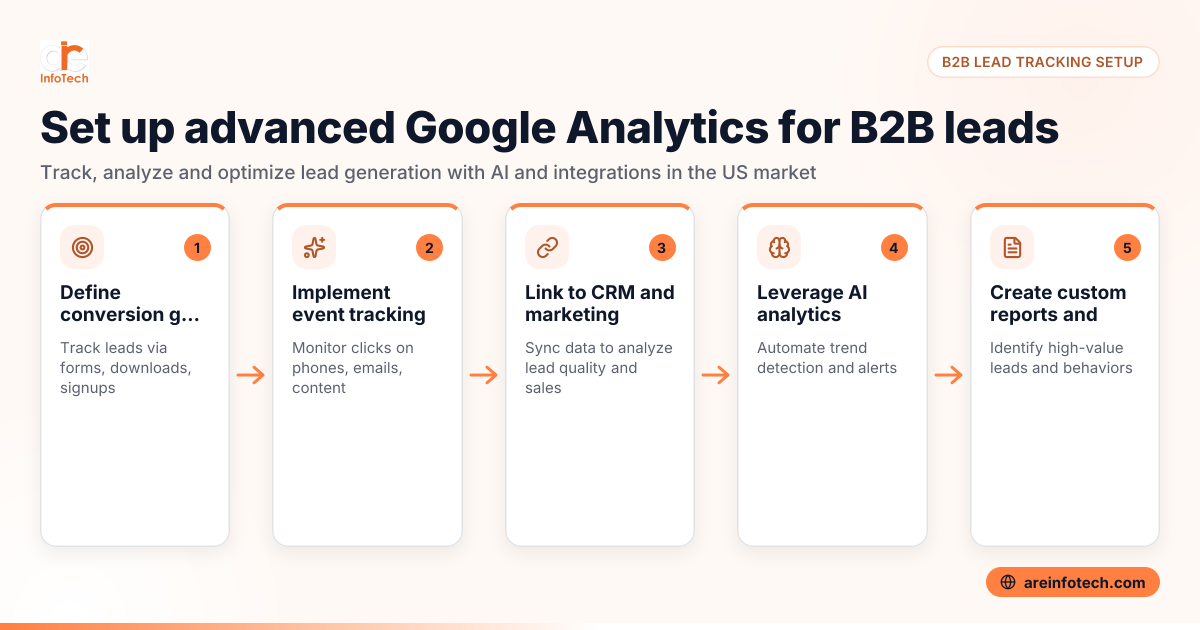
Setting up Google Analytics for effective B2B lead tracking involves several key steps:
Using these methods ensures systematic capture of lead-related data that companies can use to refine marketing and sales performance.
AI Google Analytics uses artificial intelligence to automate data interpretation and prediction. It detects anomalies, spots trends, and forecasts user behaviors quickly.
For B2B lead tracking, AI helps US businesses by alerting marketing teams to unusual lead activity and suggesting ways to optimize engagement. It makes lead data easier to understand and faster to act on, improving campaign efficiency.
AI Google Analytics refers to the artificial intelligence features integrated within Google Analytics that automate data interpretation and prediction. It uses machine learning to detect anomalies, identify trends, and forecast user behaviors.
For B2B lead tracking, AI-driven insights can alert marketing teams when lead activity changes unexpectedly or suggest optimizations based on visitor engagement patterns. This helps US businesses avoid manual data analysis bottlenecks and act faster. AI also enhances attribution modeling, helping companies allocate budgets effectively among lead sources.
Google Analytics infers lead quality by analyzing behaviors before conversion. Metrics like session duration and pages per session show visitor engagement and intent.
By creating custom segments for high-value visitors (e.g., those revisiting pricing pages), businesses can target leads most likely to convert. Multi-channel funnel data helps marketing in Houston or Chicago evaluate campaign contributions to qualified leads over time.
For example, if a lead reads several blog posts, downloads a case study, and fills out a contact form, that leads to a higher lead score internally.
Integrating Google Analytics with other marketing tools closes the loop on lead tracking:
ARE InfoTech’s expertise can help your US-based business connect Google Analytics data reliably with your sales funnel to maximize ROI.
Tracking leads requires adherence to US regulations like CAN-SPAM and TCPA. Google Analytics collects behavior data, but outreach must respect opt-in and consent rules.
Ensure lead forms include clear opt-in notices for email and phone contact. Follow How to Comply with CAN-SPAM and TCPA Regulations for B2B Email and Phone Outreach in United States for compliance strategies.
Also, align revenue tracking with state sales tax and IRS reporting requirements to avoid issues.
Custom reports and segments isolate behaviors typical of qualified leads quickly.
Create segments by geography (Detroit, Houston), visit frequency, or key events like demo requests. Use reports to spot engagement trends and which content drives qualified leads. Personalize marketing using these insights.
This granular insight boosts lead targeting accuracy.
Google Analytics has some limits:
US businesses using QuickBooks or Stripe should verify consistent revenue attribution across tools.
Optimization is ongoing:
Visit the ARE InfoTech blog regularly for tips on improving Google Analytics outcomes.
Begin by defining clear conversion goals tied to your lead generation activities. Then set up event tracking for specific actions like form submissions and contact clicks. Finally, integrate Google Analytics with your CRM to connect digital behavior with sales outcomes.
Direct offline lead measurement is limited in Google Analytics. However, you can upload offline conversions to Google Ads or your CRM to correlate digital touchpoints. Combining CRM data with Google Analytics provides a fuller picture.
AI automates data analysis, providing quicker insights into lead behavior and identifying anomalies before they impact campaigns. It also helps predict future lead trends, enabling more informed marketing decisions.
Google Analytics itself complies with major privacy standards, but businesses must configure it properly. Ensure user consent for data tracking and communicate opt-in permissions transparently as part of your lead capture process.
Weekly monitoring is recommended to catch sudden changes, while comprehensive reviews and optimizations can be conducted monthly. Frequent analysis keeps marketing aligned with lead generation goals.
Yes. By setting up custom segments and goal values, you can differentiate between low- and high-quality leads using behavioral data like time on site and page flow before conversion.
Implementing advanced Google Analytics B2B lead tracking delivers measurable benefits to American businesses across industries. By leveraging detailed insights and AI features, companies in Houston, Chicago, Detroit, and beyond can build more effective lead funnels and grow revenue. For expert guidance tailored to United States businesses, ARE InfoTech provides hands-on support to maximize your analytics setup and ROI. Start tracking smarter today.
Google Reviews


